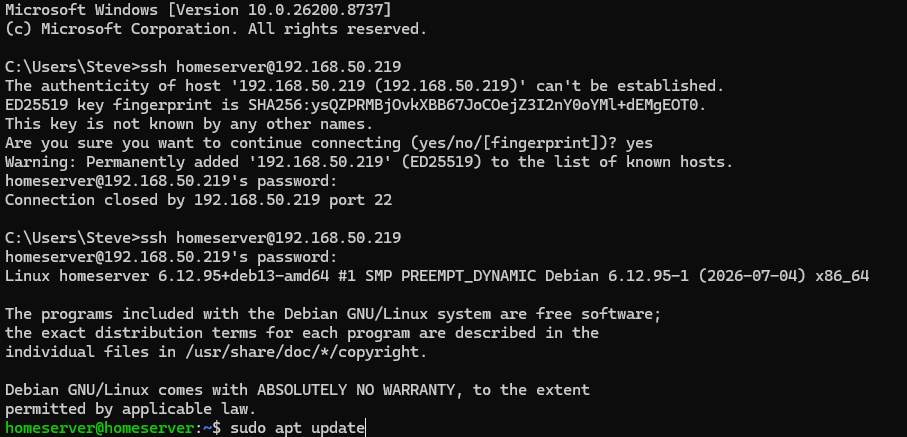
Connect & Prepare the Pi
Update Raspberry Pi OS
Refresh the software lists, install available operating-system updates and reboot before configuring storage or CasaOS.
Guide difficulty⭐⭐⭐⭐⭐ Beginner Friendly
Estimated time⏱️ Around 15–45 minutes
By the end of this guide you will have
- Checked for available Raspberry Pi OS updates.
- Installed all normal package upgrades.
- Rebooted and reconnected through SSH.
Why update before installing anything else?
The operating system image may be older than the packages currently available. Updating now gives storage tools and later applications a clean, supported base.
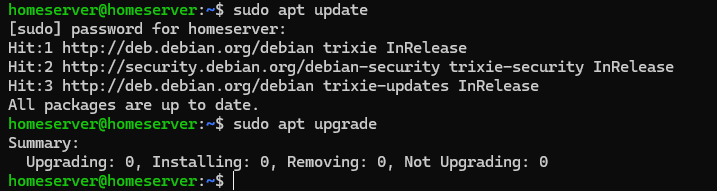
Refresh the package list
sudo apt updateThis command checks the configured software repositories. It does not install upgrades yet.
Install the updates
sudo apt full-upgrade -yThe process can take some time. Keep the SSH window open and do not interrupt the Pi.
Reboot
sudo rebootThe SSH window will disconnect. Wait two minutes, then reconnect using the same IP address.