Getting Started
What You’ll Need
Choose hardware that matches the server you want to build, without buying unnecessary parts or under-powering the finished system.
By the end of this guide you will have
- A clear shopping list for the type of server you want to build.
- An understanding of which items are essential, recommended or optional.
- A tested hardware reference for the full Home Server Guide RAID build.
- A plan for what can be upgraded later and what should be chosen correctly at the start.
Recommended before starting
- Decide whether you want a basic learning server, a media server or the full RAID build.
- Think about how much storage you are likely to need.
- Set a realistic budget, including drives and backup storage.
Choose the build that matches your goal
You do not need to buy the complete Home Server Guide hardware setup on day one. Start with the level that matches what you want to achieve.
| Build level | Typical budget | Best for | Storage approach |
|---|---|---|---|
| Basic learning build | About £100–£200 | Learning Linux, Docker and simple file sharing | microSD plus an optional USB drive |
| Media build | About £250–£500 | Jellyfin, photo backup and several containers | One or two dedicated drives |
| Full RAID build | £500+ | Large media libraries, redundancy and long-term expansion | SATA HAT with multiple matched drives |
Home Server Guide tested hardware
This is the configuration used to build and test the full guide. Matching it closely gives the best chance that your screens, ports and behaviour will match the documentation.
| Component | Tested choice | Why it was selected |
|---|---|---|
| Computer | Raspberry Pi 5, 8GB | Enough memory for Immich and several Docker containers running together. |
| Power supply | 12V DC, 10A, 120W | Powers the complete Pi, SATA HAT and multi-drive setup. |
| Storage controller | Radxa Penta SATA HAT | Connects multiple SATA drives in a compact arrangement. |
| Hard drives | 4 × 6TB WD Red | NAS-oriented drives used to create a RAID 5 array. |
| Cooling | Noctua NF-A8 5V PWM, 80mm | A quiet 5V PWM fan used to cool the complete four-drive enclosure. A separate 4-pin Molex KK to Dupont cable is required. |
| System drive | microSD card | Holds Raspberry Pi OS and the initial boot system. |
| Network | Wired Ethernet | Provides a more predictable server connection than Wi-Fi. |
Power supply
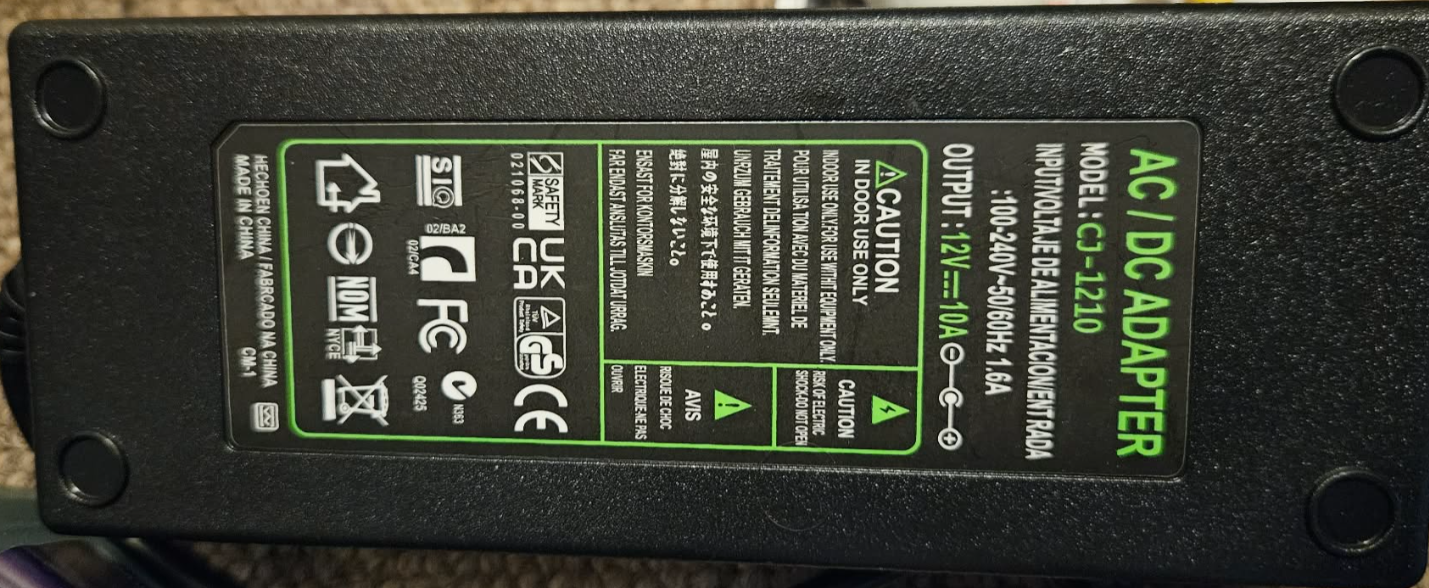
Why this was chosen
The official Raspberry Pi power supply is designed for a Raspberry Pi and normal USB accessories. The full Home Server Guide build also powers a SATA HAT and four hard drives. Those drives draw extra current, particularly while starting, so the complete system needs substantially more power than the Pi alone.
Do I need the same supply?
- Yes, or an equivalent properly matched solution, when following the complete SATA HAT and multi-drive build.
- No,use a separately powered solution that is correctly matched to your chosen hardware. The reference build remains powered through the SATA HAT barrel jack.
Raspberry Pi 5
Raspberry Pi 5 — 8GB
The tested choice for the full guide.
- Provides enough memory for Immich and multiple containers.
- Leaves headroom for future services.
- Matches the hardware used throughout this documentation.
Why not the 4GB model?
A 4GB Pi can run a smaller server, but the full Home Server Guide workload is designed around the 8GB model. In testing, memory-heavy services such as Immich make the 8GB model the practical minimum for this complete build.
Storage controller and hard drives
Radxa Penta SATA HAT
The SATA HAT allows several SATA drives to connect to the Raspberry Pi. It was chosen because it creates a compact, tidy multi-drive system suitable for a RAID array.
Hard drives
The tested build uses four matching 6TB WD Red drives. Matching capacities make RAID planning simpler, and NAS-oriented drives are designed for long-running storage workloads.
Compatible alternatives
Powered USB enclosure
Easier to source and can power its own drives. USB behaviour and device paths may differ from the guide.